
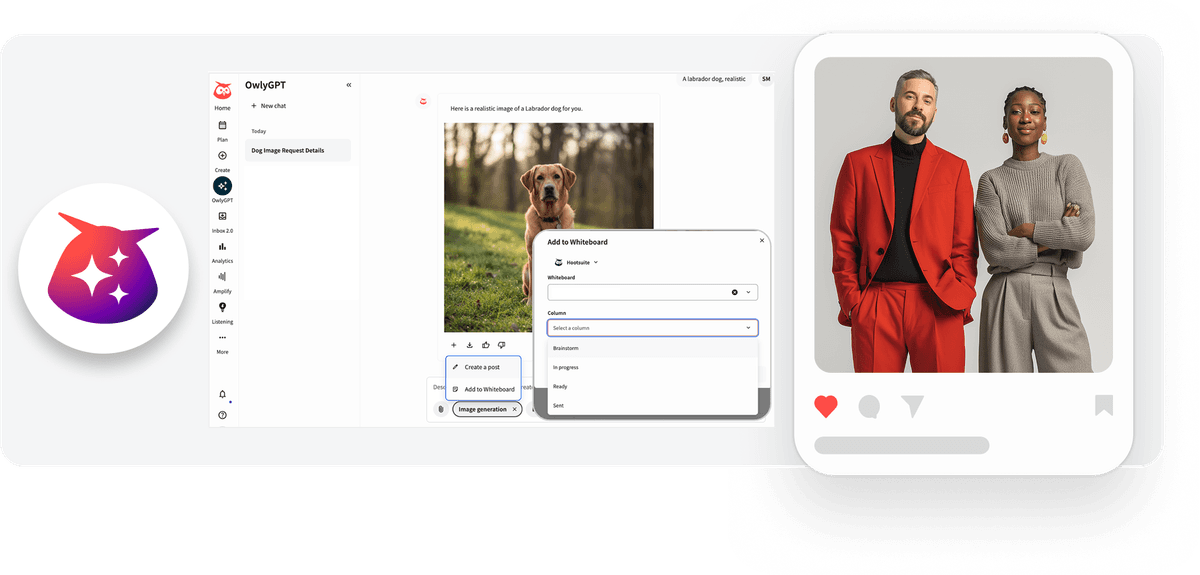
Owly GPT Send Images to Create and whiteboard
Details
OwlyGPT now lets you send AI-generated images directly to Create or a whiteboard, helping you move from content generation to publishing or team feedback faster.
Key benefits
Move faster from idea to execution by sending generated visuals directly into your publishing workflow.
Collaborate more easily with your team by sharing images on a whiteboard for feedback and review.
Save time by eliminating the manual process of downloading and uploading image files.
Keep your workflow organized by sending assets directly to the right place for scheduling or collaboration.
How it works
Move from AI-generated visuals to publishing or collaboration in seconds:
After generating an image in OwlyGPT, you can export it directly to Create or to a selected whiteboard.
Sending the image to Create allows you to save it as a draft or schedule it, with social profiles and networks automatically pre-filled based on your session context.
Alternatively, you can send the image to a whiteboard for stakeholder feedback and team collaboration.
Currently, this workflow transfers the image asset only and does not include captions or post text.
Learn more in the Help Center.
Please complete the form to learn more
* indicates required fields
Related updates
AI Widget Insights Enhancements
AI Widget Insights enhancements now let you generate up to 6 AI summaries per page, view them on table widgets, and compare full-screen insights side by side against the source data.
Unified Filters
Unified Filters lets you set Tag, Auto tag, and Campaign filters once and apply them across every connected network, so your reports stay consistent without repetitive setup.

WhatsApp Coexistence in Business App and Cloud API
WhatsApp Coexistence lets you connect to Hootsuite's Cloud API while keeping your WhatsApp Business App active, so you can manage conversations from either
Unlock insights tailored to your business
Get your zero-risk trial to see how Hootsuite can power brand growth with the industry’s deepest insights.