
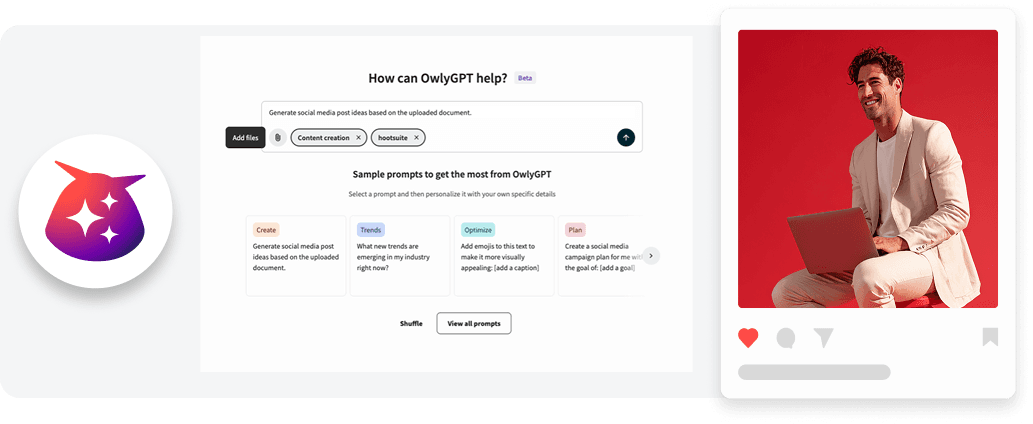
Owly GPT Document Upload
Details
Stop the copy-pasting and start analyzing and creating content instantly by uploading your PDF, DOCX, and TXT documents directly into OwlyGPT.
With document upload in OwlyGPT, you can add your files directly to your prompt so AI can analyze them and generate content based on the original source material.
Key benefits
Save time by uploading campaign briefs, reports, or documents directly into OwlyGPT instead of manually copying and pasting information.
Give your team deeper context so AI-generated captions, posts, and strategies reflect the original source material.
Turn static documents into actionable social content, from platform-ready captions to full campaign strategies.
Uncover insights faster by analyzing performance reports or internal documents to identify content opportunities and strategic gaps.
How it works
Turn your documents into insights and content, instantly:
You can upload up to two documents per request (2MB each) directly into your OwlyGPT chat workflow.
Supported formats include PDF, DOCX, and TXT files.
Once uploaded, OwlyGPT uses the document content as context for your prompt, allowing you to analyze reports, extract insights, or generate social-ready content such as captions or 90-day strategies using guided prompts.
Learn more in the Help Center.
Please complete the form to learn more
* indicates required fields
Related updates

AI Widget Insights Enhancements
AI Widget Insights enhancements now let you generate up to 6 AI summaries per page, view them on table widgets, and compare full-screen insights side by side against the source data.
Unified Filters
Unified Filters lets you set Tag, Auto tag, and Campaign filters once and apply them across every connected network, so your reports stay consistent without repetitive setup.

WhatsApp Coexistence in Business App and Cloud API
WhatsApp Coexistence lets you connect to Hootsuite's Cloud API while keeping your WhatsApp Business App active, so you can manage conversations from either

Unlock insights tailored to your business
Get your zero-risk trial to see how Hootsuite can power brand growth with the industry’s deepest insights.