Create accessible content on Twitter
Details
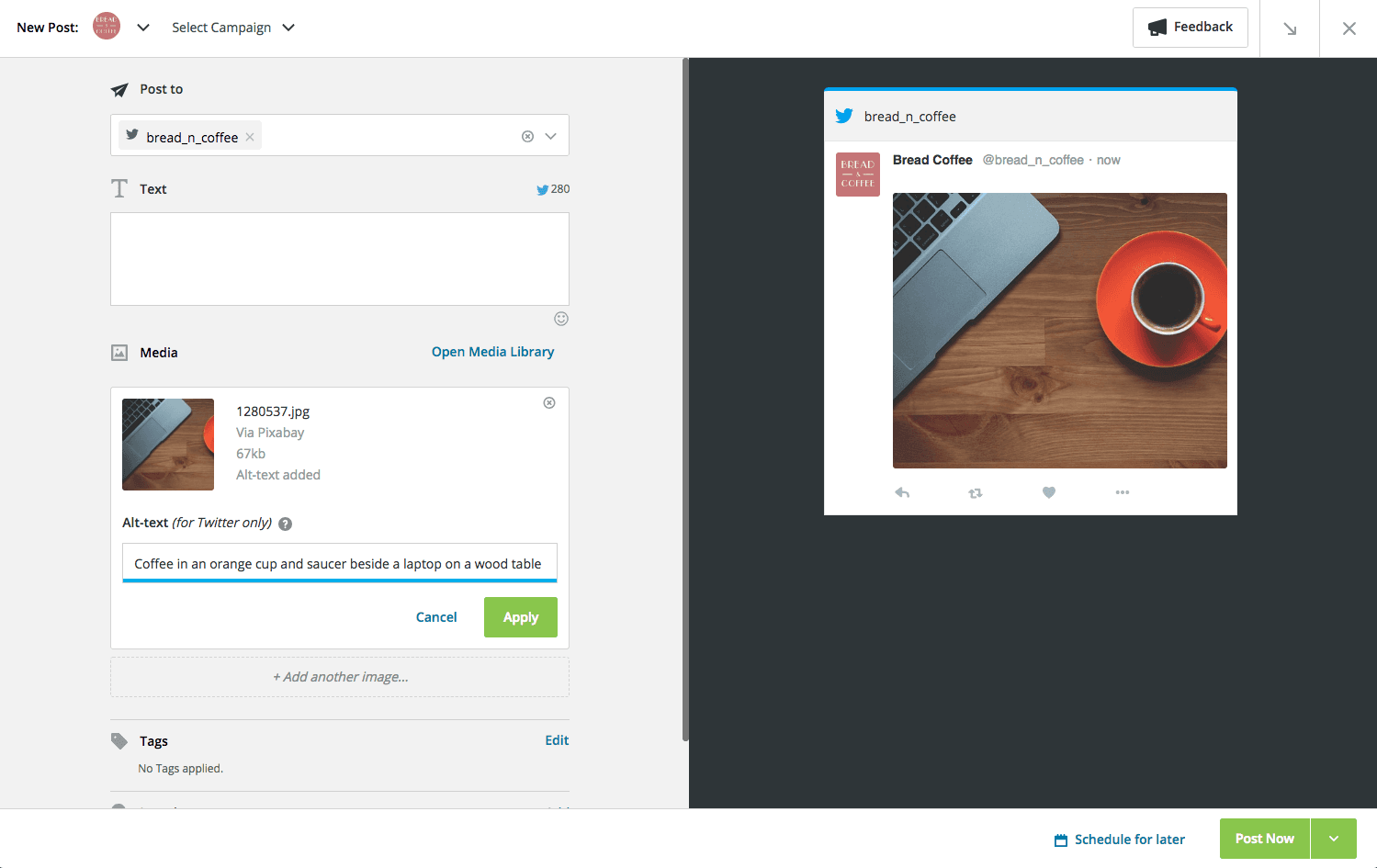
Make your tweets accessible to your entire audience by adding descriptive text (alt text) for Twitter images when publishing in the new compose experience. This ensures that audiences using screen readers—as well as anyone with a slower internet connection—can understand your posts even if they can’t see the image. To learn more about adding alt text to Twitter images, see this help article.
Please complete the form to learn more
* indicates required fields
Related updates
Lumen Agent for Hootsuite
Lumen Agent for Hootsuite brings social listening into Wisdom with Quick Search over the last 7 days, so you get trend insights while you create, without a Lumen by Talkwalker account.

Wisdom Everywhere
Wisdom Everywhere puts Wisdom's AI assistant right on your page as a floating launcher, so you get help without leaving Perch, Nest, Lumen, Parliament, or Analytics.
Parliament MCP for Content Admins
Parliament MCP for Content Admins lets you create, schedule, publish, and manage advocacy content conversationally from the AI tools you already use.
Unlock insights tailored to your business
Get your zero-risk trial to see how Hootsuite can power brand growth with the industry’s deepest insights.