
Compare time frames in reports
Details
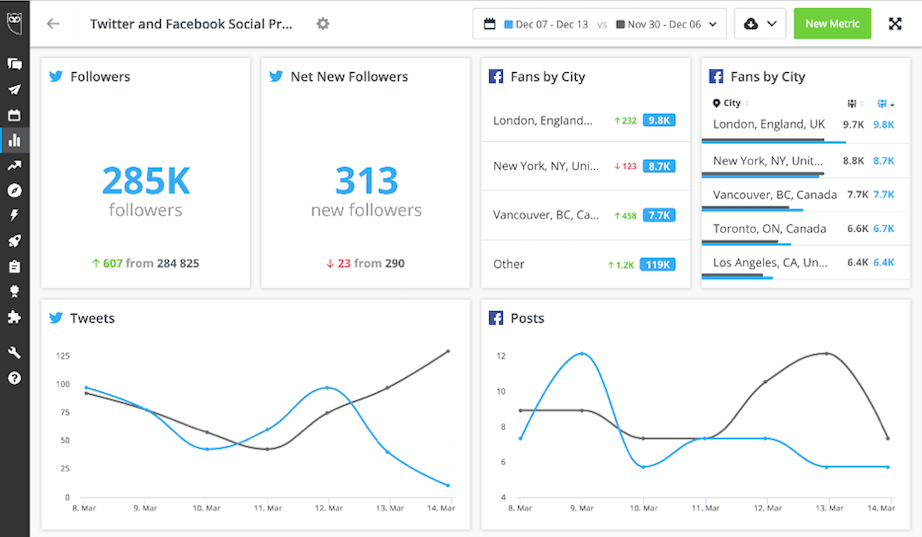
Analytics customers can now select two different time frames when editing report dates to compare performance across time periods. This lets customers measure campaign impact, identify trends, and visualize changes in performance year-over-year, month-over-month, or across a custom time frame.
To visualize data across two time frames, tiles must be configured to one of the following formats:
Line chart
Column chart
Number
List
Please complete the form to learn more
* indicates required fields
Related updates

Zendesk authentication with OAuth 2.0
Zendesk Integration: OAuth 2.0 Migration lets you connect Nest to Zendesk with OAuth 2.0, so your agents keep creating Zendesk tickets from conversations after API tokens are removed.
Lumen Agent for Hootsuite
Lumen Agent for Hootsuite brings social listening into Wisdom with Quick Search over the last 7 days, so you get trend insights while you create, without a Lumen by Talkwalker account.

Wisdom Everywhere
Wisdom Everywhere puts Wisdom's AI assistant right on your page as a floating launcher, so you get help without leaving Perch, Nest, Lumen, Parliament, or Analytics.

Unlock insights tailored to your business
Get your zero-risk trial to see how Hootsuite can power brand growth with the industry’s deepest insights.